
Description
Ceramic Zirconia Hotend Heating Assembly Kit for Bambu Lab X2D — Left or Right
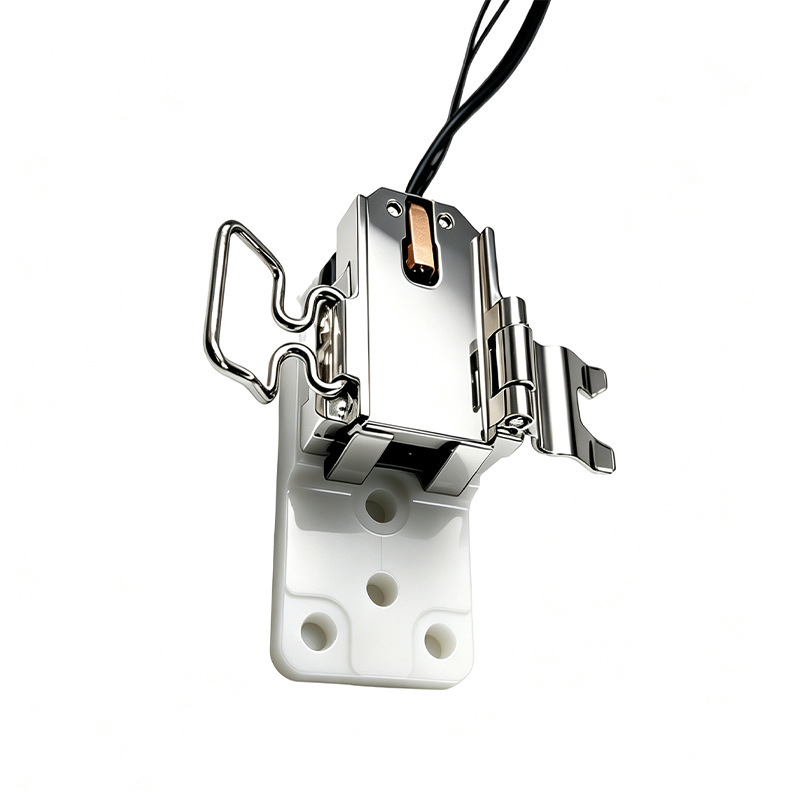
This compatible heating assembly kit replaces the heater and thermistor on a Bambu Lab X2D hotend. The heater cartridge and thermistor come pre-installed in a zirconia ceramic base with a quick-clamp design, so you can swap the whole assembly in one go rather than diagnosing which individual part has failed.
The X2D has two hotends, and each has its own heating assembly. Choose the Left or Right version to match the side you’re repairing.
What the Heating Assembly Does
The heating assembly clamps around the quick-swap hotend. It heats the nozzle to melt filament and reports the nozzle temperature back to the printer. It stays on the toolhead when you swap hotends, so if a heating fault follows you from one hotend to another, the assembly is the part to replace, not the hotend.
Zirconia Ceramic Base — Excellent Thermal Insulation
The base is made from zirconia ceramic, a material with very low thermal conductivity. It insulates the heated parts from the surrounding toolhead, helping keep heat where it’s needed, which supports stable temperatures and protects nearby components.
Pre-Installed Heater & Thermistor
The heater cartridge and thermistor arrive installed in the base, so there’s no need to fit them separately or match components. The quick-clamp design holds the hotend securely and lets you remove it again quickly for maintenance or a nozzle swap.
Left vs Right — Which One Do You Need?
Left
For the left (main) hotend position on the X2D.
Right
For the right (auxiliary) hotend position on the X2D.
The two sides are not interchangeable. Check which hotend is showing the fault, and order the matching side. If both sides have problems, order one of each.
When to Replace
Nozzle not heating with any hotend fitted, hotend temperature abnormal errors, slow heat-up or temperature overshoot, heater or thermistor HMS error codes, damaged or frayed wiring, a cracked or discoloured ceramic base, and filament melted onto the assembly after a printing failure.
Because the assembly stays on the toolhead, a fault that persists across different hotends points to this part.
Installation
Power off the printer and let the hotend cool completely before starting. Remove the toolhead front cover, unclip the heating assembly from the hotend, disconnect the wiring, and fit the new assembly, making sure the connector is fully seated and the cable isn’t pinched when you refit the cover. Refer to the Bambu Lab Wiki for the X2D hotend heating assembly replacement guide for the full step-by-step procedure.
Never touch the heating assembly or nozzle while the printer is hot.
Compatibility
Bambu Lab X2D — left and right versions sold separately.
Not compatible with the H2D, H2S, H2C, P2S, A1 series, or A2L. Each platform uses its own heating assembly.
What’s Included
Hotend heating assembly × 1 (zirconia ceramic base, heater cartridge, thermistor, clamp)
Fixing screws
About This Part
This is a compatible, non-genuine part made to fit the Bambu Lab X2D. Check the connector is fully seated and the clamp is secure before printing.

Reviews
There are no reviews yet